

What once required complex multi-service architectures, extensive DevOps overhead, and significant security considerations can now be accomplished within Snowflake's integrated environment. This represents a rethinking of how data teams approach transformation workflows.
The summit's focus on native DBT integration highlights the consolidation of previously disparate services into cohesive platforms. For data engineers and architects weighing their transformation strategy, understanding this change and its implications becomes essential for informed decision-making.
DBT and Its Alternatives
dbt (Data Build Tool) has become the de facto standard for data transformations, handling the "T" in ELT pipelines. It offers cross-platform compatibility, flexibility, an approachable learning curve, SQL and Python workload support, and an open-source foundation. However, the open-source version now faces limitations due to dbt Fusion's emergence. While this might raise questions about adopting dbt for new projects, it remains a strong choice thanks to its maturity, widespread adoption, and rich ecosystem.

The primary competitors to dbt — SQLMesh, Coalesce, and Snowflake's native solution — all use Directed Acyclic Graphs (DAGs) to manage tasks and dynamic table sequences. Coalesce works well for greenfield projects or when existing dbt pipelines become unwieldy, though it appears less mature with a smaller ecosystem than dbt. Its lineage visualization capabilities do stand out. SQLMesh doesn't seem mature enough for production use at the time of writing.
Snowflake's DAG presents another solid option for new projects. One key advantage is that you can selectively integrate dynamic tables into a dbt project while maintaining dbt-native transformations, creating a flexible hybrid solution.
The Previous State: Complex Infrastructure Requirements
Previously, running dbt workloads in Snowflake required onboarding development, deployment, and orchestration tools. While dbt consumes minimal resources, it still demands an additional service layer requiring maintenance.
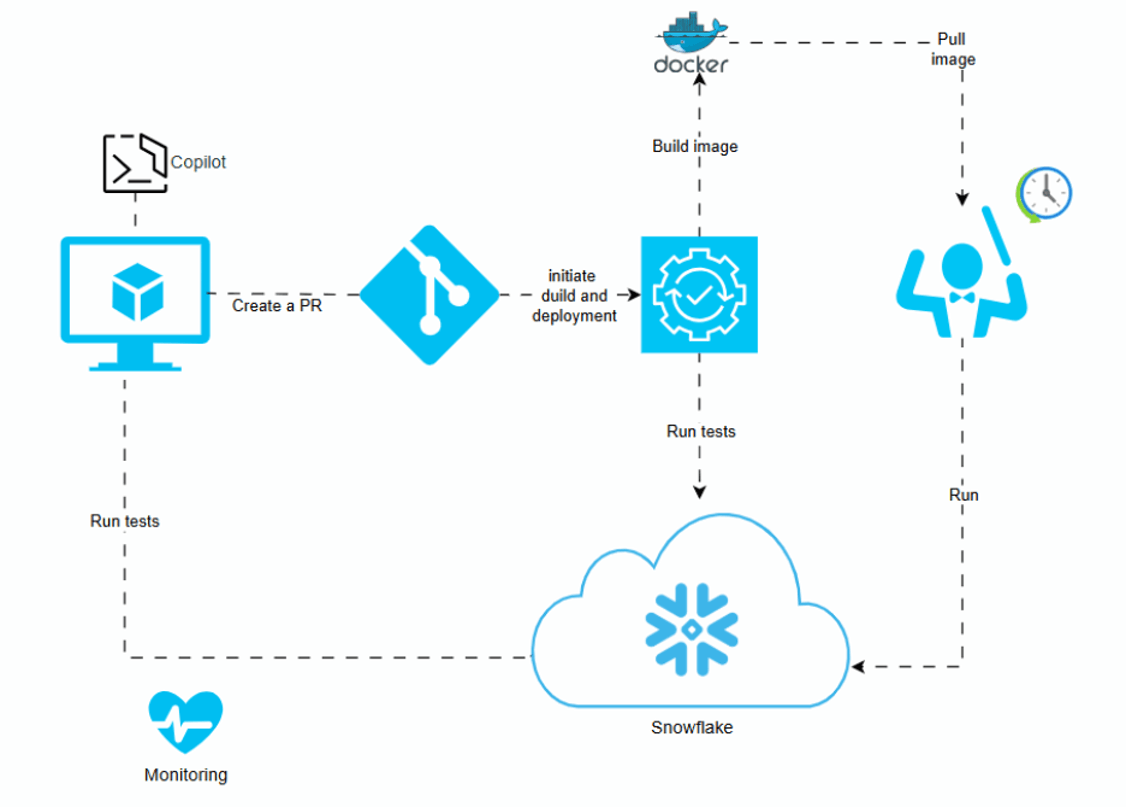
A secure and reliable dbt setup typically involves multiple components: a developer's machine with an IDE, a Git repository, and an orchestration service such as Apache Airflow, Dagster, Snowflake Tasks, GitHub Actions, or, at minimum, a virtual machine running Cron jobs. Add monitoring and notification services to the mix. Most components required Snowflake connections, introducing additional complexity and security risks.
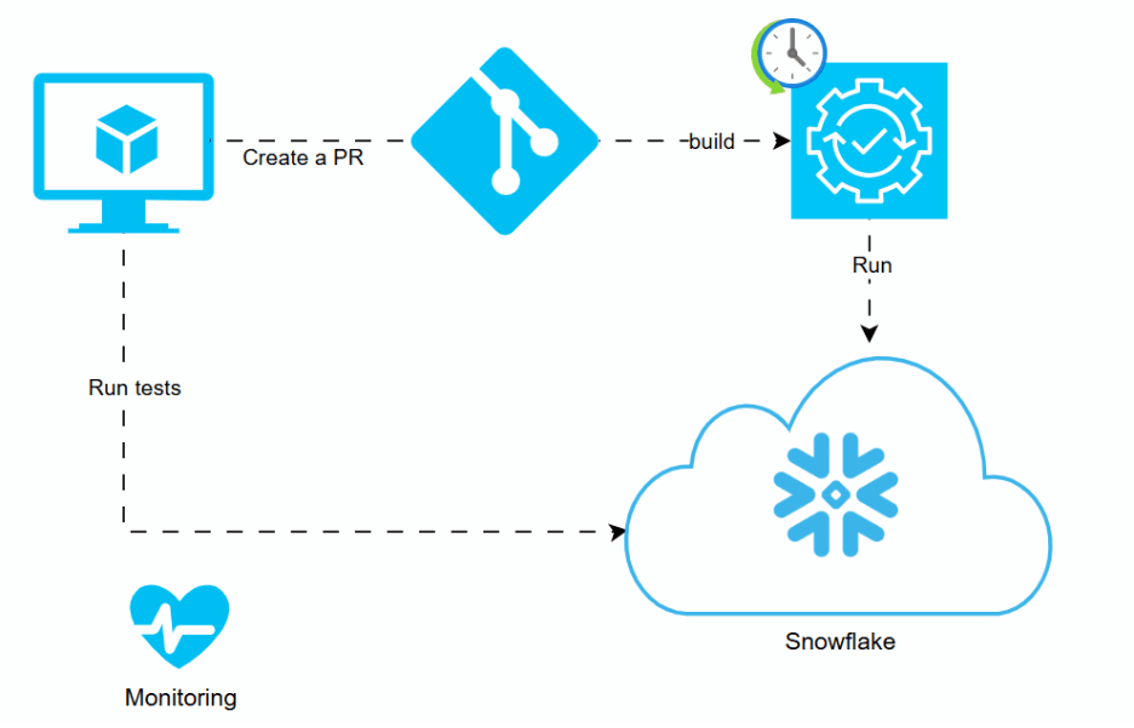
Advanced setups increased this complexity further, involving containerized environments for version consistency, additional orchestration and deployment services, and optional tools like Copilot or Cursor for enhanced performance. Any of these configurations demanded tight security controls and significant DevOps effort, particularly for multi-environment support.
The Evolutionary Step: Snowpark Integration
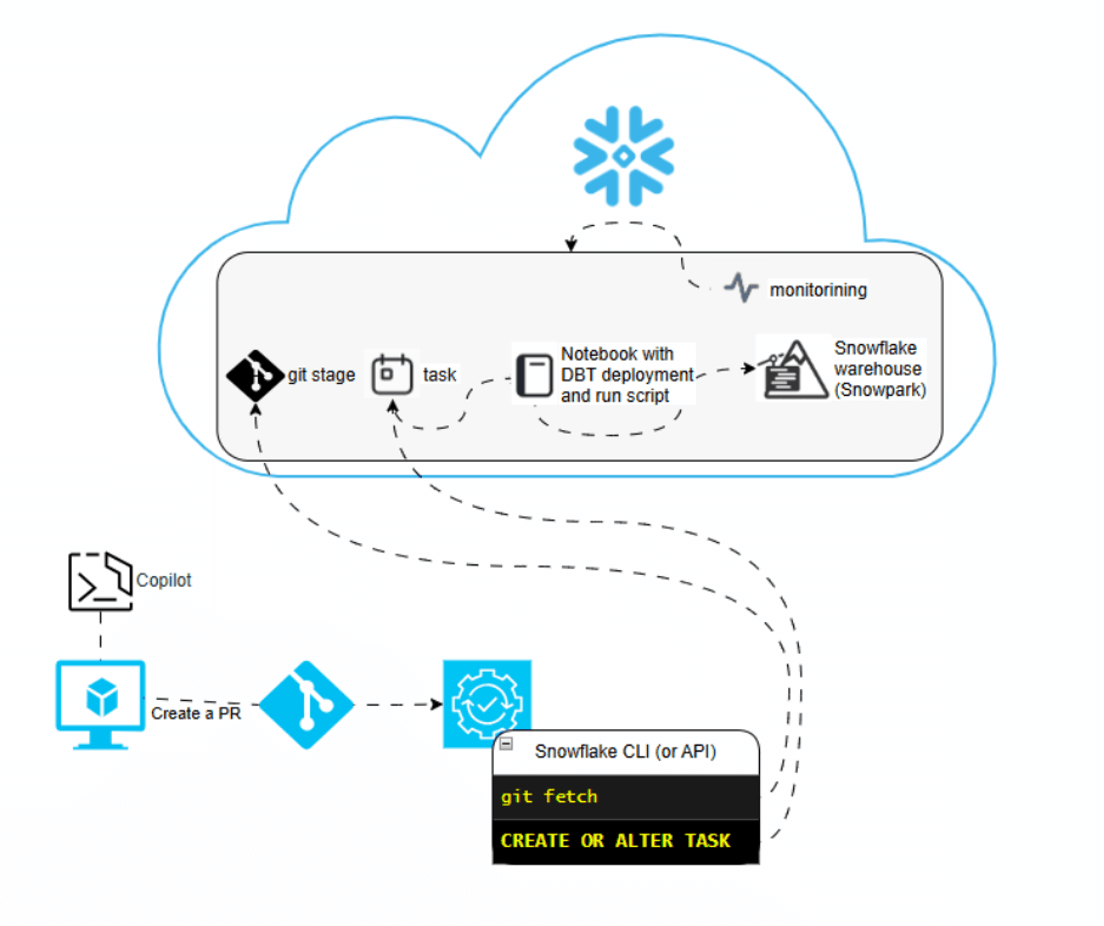
A more Snowflake-native approach emerged: running and orchestrating dbt using Snowpark with Snowflake Tasks for orchestration. This setup provided greater consistency from service and control perspectives but required additional notebook code to deploy and run transformations. It lacked IDE capabilities for developing, testing, and deploying dbt directly within Snowsight. Despite these limitations, it remained viable for teams needing additional flexibility.

The Current State: Native Integration
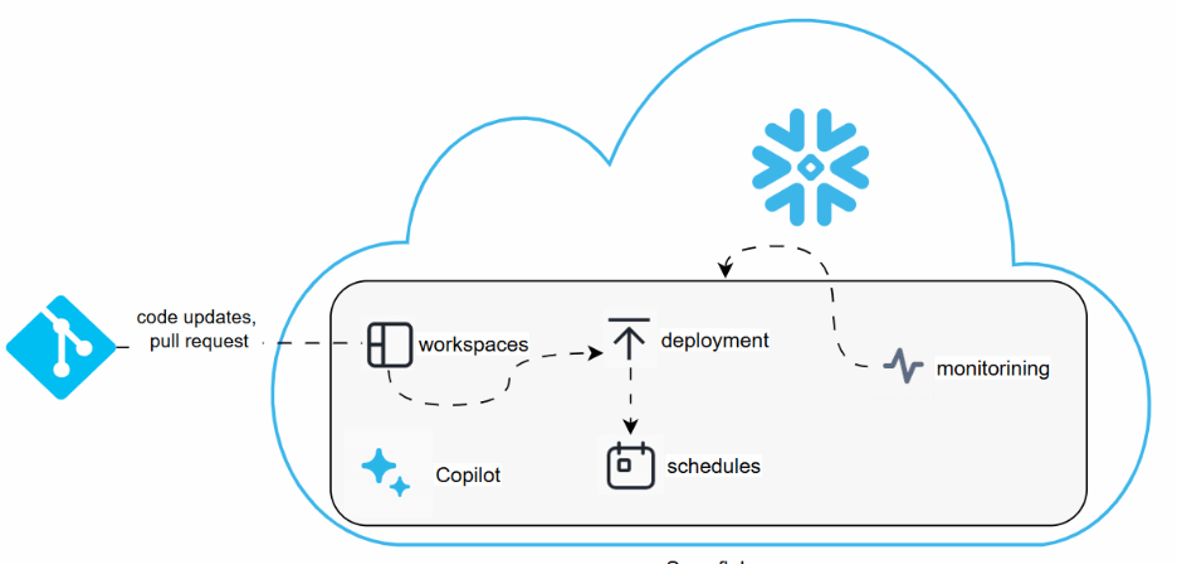
Snowflake's native dbt support eliminates most of these service requirements. With native dbt support, teams need only a Git repository — everything else runs inside Snowflake, though with some limitations. This setup proves far easier to launch and maintain while significantly reducing security risks at no additional cost.
The most straightforward configuration now relies entirely on Snowflake services. Importantly, no external service requires access to your data, substantially improving security posture. This streamlined approach benefits smaller data engineering and analytics teams by simplifying deployment and eliminating daily DevOps involvement.
Teams can now:
- Use Snowflake Git integration to pull code from repositories
- Develop dbt transformations directly in Snowflake workspaces
- Compile and run transformations in development environments
- Deploy and schedule dbt tasks through the Snowflake UI
- Monitor runs and performance and set up notifications within Snowflake's monitoring services
- Control access through Snowflake's governance framework
- Execute operations via SQL within Snowflake or through Snowflake CLI
Git integration is optional. For solo developers, starting with a workspace for proof-of-concept work makes sense, as Snowflake saves deployment versions as separate artifacts, and codebase risks remain minimal.
Current Limitations
While Snowflake's consolidated solution appeals to many teams, limitations persist:

Limited deployment automation: The Snowflake UI enables deployment, but triggering deployments from pull requests isn't yet supported. Teams requiring orchestration across different components still need deployment automation.
Snowflake Copilot integration: Currently ignores dbt code, limiting AI assistance for dbt-specific development.
Recommended Hybrid Approach
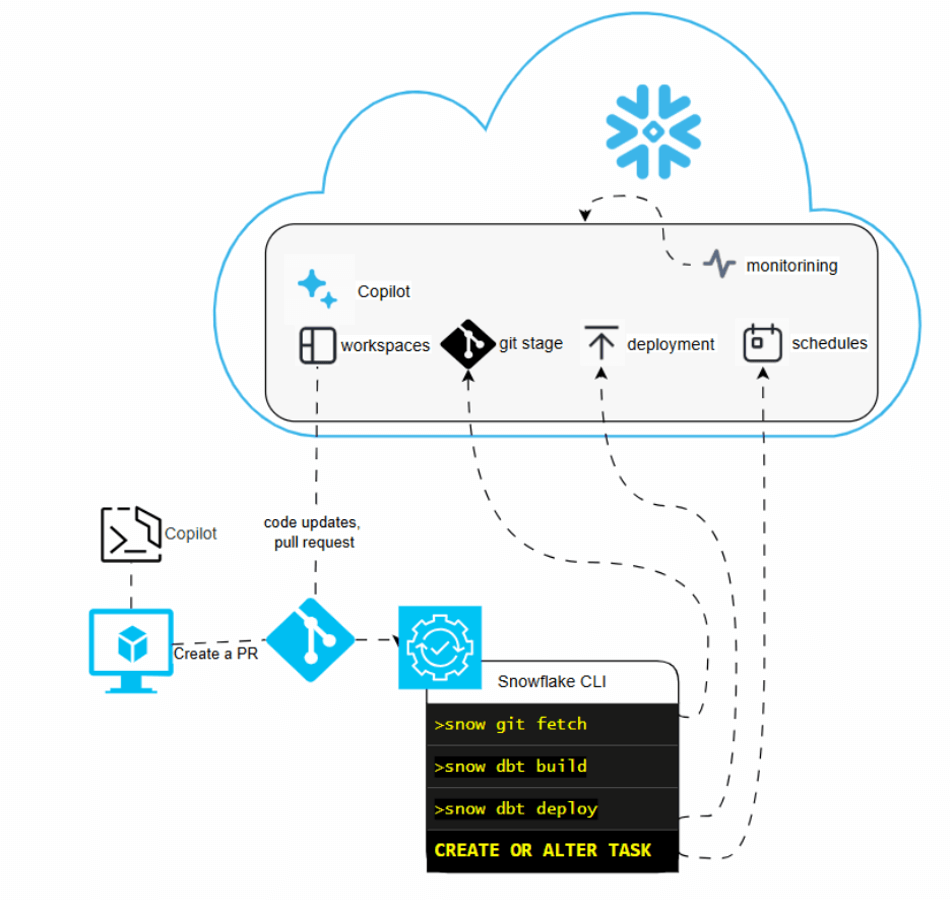
To address these gaps, consider using Git-based deployment pipelines with Snowflake CLI for automation, combined with your preferred IDE and AI assistant. While slightly more complex than the pure Snowflake approach, this setup delivers significant benefits over previous generations:
- Enhanced security posture
- No additional monitoring services required
- Integration with Snowflake Copilot for SQL development
- Simplified deployment pipelines
The improved configuration includes your preferred IDE with AI assistance and a deployment service (GitHub Actions, Octopus Deploy, or Azure DevOps) to trigger deployment pipelines and create schedules using Snowflake CLI.
Conclusion
Snowflake has advanced data democratization, which is another step forward. dbt with Snowflake now represents a straightforward, cost-effective setup that eliminates additional service requirements, reducing infrastructure and DevOps resource needs. Teams can begin adopting dbt transformations with minimal orchestration software knowledge while avoiding dbt Cloud licensing costs.
The approach allows teams to start simple and evolve their setup as requirements grow — a practical path forward for organizations looking to modernize their data transformation workflows without the traditional complexity overhead.
Need help implementing dbt with Snowflake? DataArt's data engineering team has extensive experience designing and implementing modern data transformation workflows. Whether you're migrating from legacy systems or building new capabilities, we can help you navigate the technical decisions and implementation details. Learn more about our Snowflake services.